Overview
FireSTARR is designed to support wildland fire response decision-making and is the fire growth algorithm originally included in the FireGUARD suite of programs.
It focuses on the generation of burn probabilities from replicated simulation of fire growth, smouldering, and natural extinction under weather and stochastic fire behaviour scenarios.
This documentation is intended to assist users in understanding the FireSTARR program, its inputs and outputs, and how to run it.
For additional technical details see:
-
Usage
-
Probability
-
Settings
-
Fire Environment Arguments
-
Software Setting Arguments
-
Model Setting Arguments
-
License
Specifies the arguments for use when using FireSTARR.
Type |
string |
Required |
Yes |
Default |
None |
Example:
firestarr.exe <output_dir> <yyyy-mm-dd> <lat> <lon> <HH:MM> [OPTION]...
Basic Help Printout
Arguments are:
E:\firestarr\firestarr.exe
Usage: firestarr.exe <output_dir> <yyyy-mm-dd> <lat> <lon> <HH:MM> [OPTION]…
Usage: firestarr.exe surface <output_dir> <yyyy-mm-dd> <lat> <lon> <HH:MM> [OPTION]...

Calculate probability surface and save output in the specified directory

Usage: firestarr.exe test <output_dir> [OPTION]...

Run test cases and save output in the specified directory

 Input Options
   -h                        Show help
   -v                        Increase output level
   -q                        Decrease output level
   --ascii                   Save grids as .asc
   --no-tiff                 Do not save grids as .tif
   -i                        Save individual maps for simulations
   -s                        Run in synchronous mode
   --points                  Save simulation points to file
   --no-intensity            Do not output intensity grids
   --no-probability          Do not output probability grids
   --occurrence              Output occurrence grids
   --sim-area                Output simulation area grids
   --raster-root             Use specified directory as raster root
   --fuel-lut                Use specified fuel lookup table
   --tz                      UTC offset (hours)
   --curing                  Specify static grass curing
   --force-greenup           Force green up for all fires
   --force-no-greenup        Force no green up for all fires
   --log                     Output log file
   --wx                      Input weather file
   --deterministic           Run deterministically (100% chance of spread & survival)
   --confidence              Use specified confidence level
   --perim                   Start from perimeter
   --size                    Start from size
   --ffmc                    Startup Fine Fuel Moisture Code
   --dmc                     Startup Duff Moisture Code
   --dc                      Startup Drought Code
   --apcp_prev               Startup precipitation between 1200 yesterday and start of hourly weather
   --output_date_offsets     Override output date offsets
Example use of the tool
Note: FireSTARR will look to the location it is invoked from for it’s information to run. Any datasets the model requires need to be defined with appropriate flags.
.\firestarr.exe Output_Fire 2026-05-01 53 -100 13:00 --ffmc 80 --dmc 60 --dc 300 --tz 8
FFMC, DMC, DC and Timezone are mandatory fields to run FireSTARR
Determine rate of spread from probability of spread threshold.
Parameters |
threshold (Probability of spread threshold) |
Returns |
Rate of spread at given threshold (m/min) |
Probability of spread is converted into the ROS that would give it, and then when checked the fire burns if ROS > ROS_threshold
ROS = 25.0 / 4.0 * log(-(exp(41.0 / 25.0) * threshold) / (threshold - 1));
Should be the inverse of:
P = 1 / (1 + exp(1.64 - 0.16 * ros));`
Where P is the threshold above.
Probability of spread |
Rate of spread (m/min) |
~16.2465% |
0 |
~18.5427% |
1 |
~23.8667% |
3 |
~30.1535% |
5 |
~49.0000% |
10 |
~68.1354% |
15 |
~82.6353% |
20 |
90% |
23.9827 |
95% |
28.6527 |
98% |
34.5739 |
99% |
38.9695 |
==== In Practice
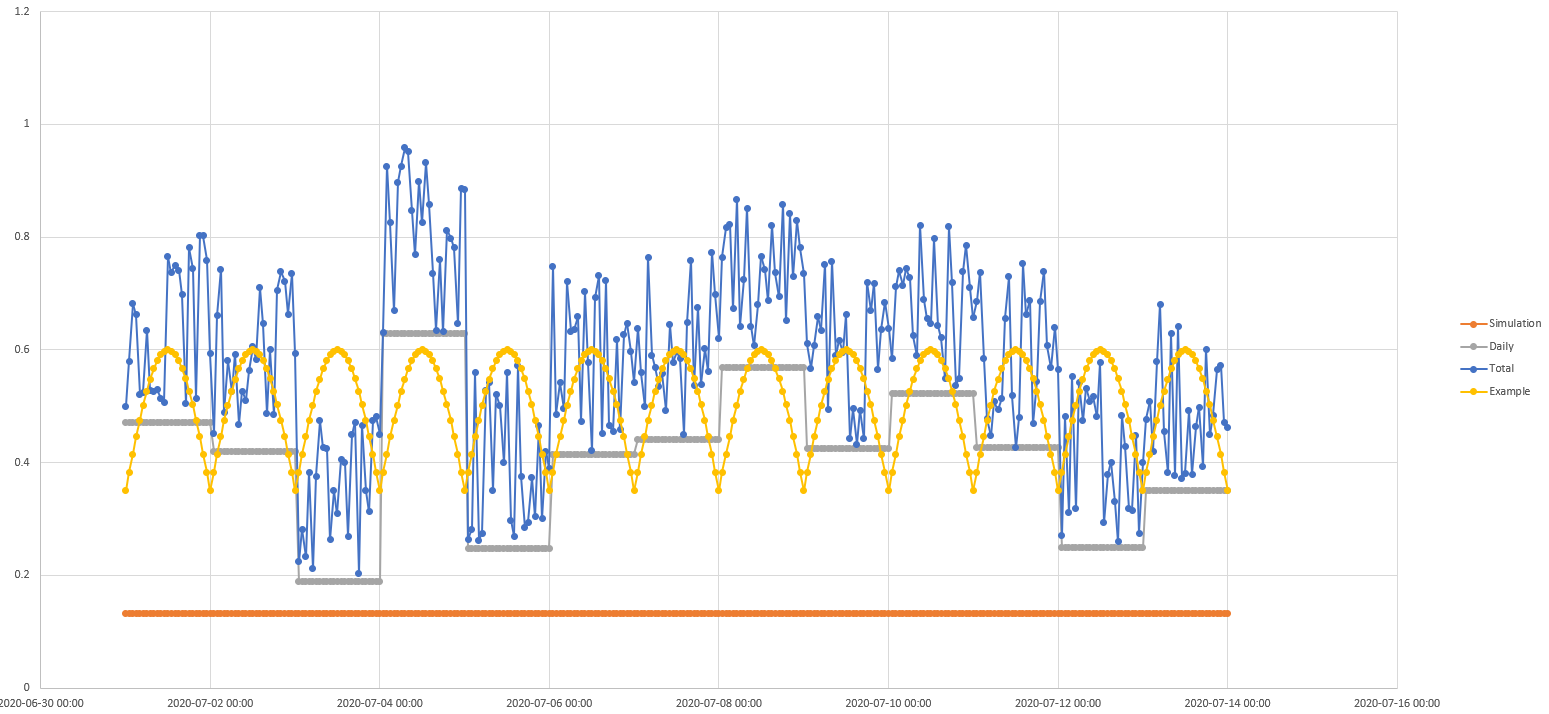
The spread potential thresholds are set using 3 separate random numbers, scenario, day and hour. These numbers are all drawn independently and aggregated into a total weight after being multiple against their weights as established with the THRESHOLD_***_WEIGHT.
Spread Example 1
Spread Example 2
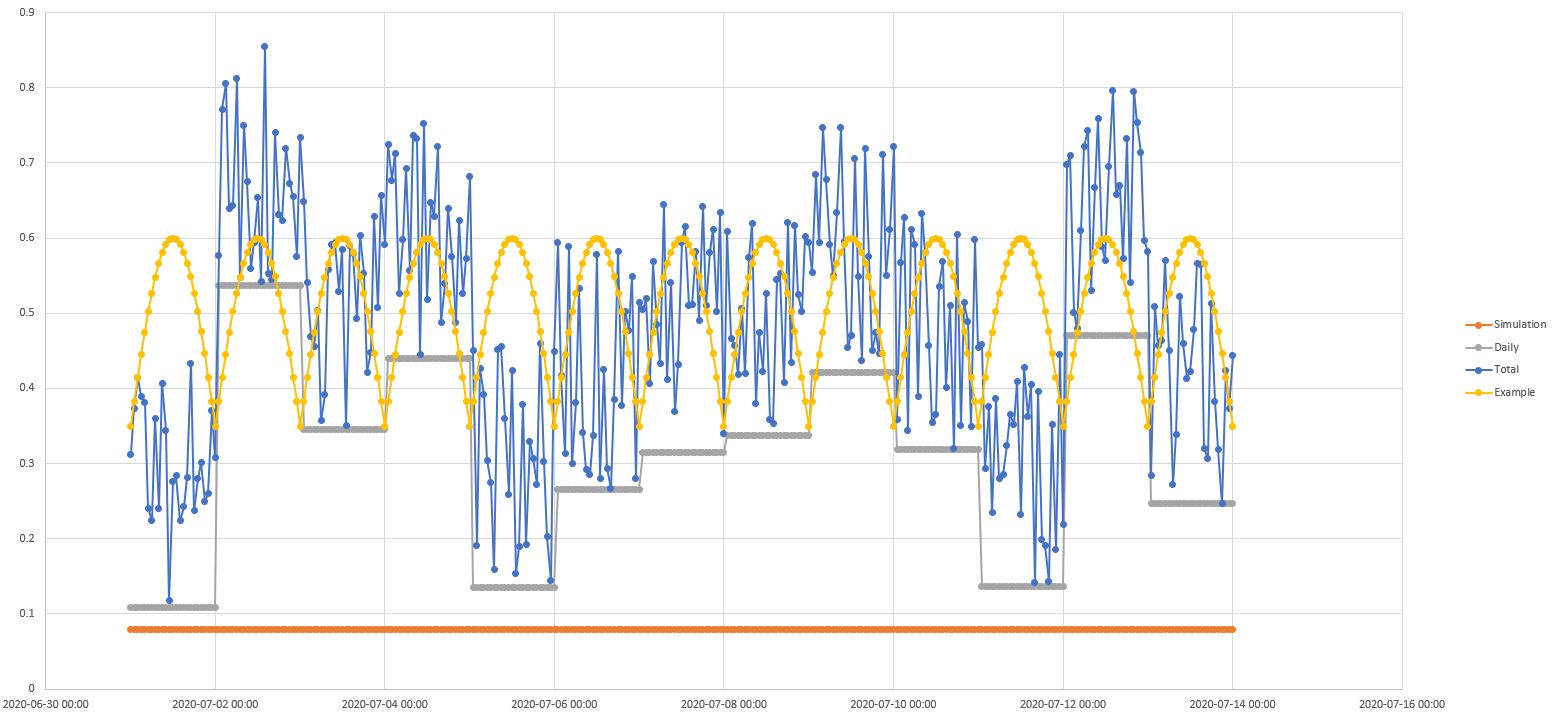
What this looks like in practice is as follows.
Wherever the weighted simulation + daily + total threshold is above the value required for spread then the fire will spread. With the same scenario for weather, there can still be different outcomes. For example, if the scenario produced the sine-wave for the rate of spread, you can see that for the 2nd scenarios 1st day, the rate of spread is above the threshold most of the time, and thus it would spread, whereas the 1st scenario would spread briefly before noon, but otherwise not spread during that day.
Think of it like hourly burning conditions. The fire is only allowed to spread when the rate of spread at the pixel exceeds the threshold for that hour. By running many simulations with these thresholds being selceted randomly, you can get a sense of the likelihood of spread for a given scenario within a given timeframe.
References Podur, Justin & Wotton, Mike. (2011). Defining fire spread event days for fire-growth modelling. International Journal of Wildland Fire. 20. 497-507. 10.1071/WF09001.
The settings.ini file contains a number of definitions that allow FireSTARR to find the information it requires more rapidly as well as a number of constants for use within your simulation.
All of these settings can be found within the settings.ini file, but are also available as command line arguments. The command line arguments will override the settings.ini file.
Critical components
The fuel look up table (how FireStarr knows what the numbers in your fuel grid represent), the root to your raster data, and the output date offsets (what your forecast horrizons are).
RASTER_ROOT = ./generated/grid/100m Root directory to read rasters from. FireSTARR will read from this location without explicit definition
MINIMUM_ROS = 0.0Minimum rate of spread before fire is considered to actually be spreading. If this is above 0 it would yield results where the fire is not moving so long as the rate of spread is below the value defined here.
MAX_SPREAD_DISTANCE = 0.4 Maximum distance that head can spread per step (* cell size).This setting will ensure very fast fires are polling the underlying data so it’s always spreading the fuels represented by the underlying grid. If you go beyond 1 assessments of the fuel grid would not
OUTPUT_DATE_OFFSETS = [1,2,3,7,14] Days to output probability contours for. In this case, days 1, 2, 3 7 and 14 days. Can be any number from 1 to the number of days present in the forecast.
FUEL_LOOKUP_TABLE = ./fuel.lut Lookup table (LUT) for fuels (prometheus format). The Lookup table is also the location where you would provide meaningful overrides for non-fuels. The LUT that is shipped with FireSTARR has non-fuels (except water) being turned into D-2 or some low conifer M series fuel. This ensure some spread through non-fuel.
MINIMUM_FFMC = 65.0 Minimum FFMC for fire to spread. This is essentially a global burning condition, without an FFMC over 65, fire will not spread.
MINIMUM_FFMC_AT_NIGHT = 85.0 Minimum FFMC for fire to spread at night. This is essentially a global burning condition, without an FFMC over 85, fire will not spread.
OFFSET_SUNRISE = 0.0 Time after sunrise to start burning (hours). Another global burning condition to limit fire spread.
OFFSET_SUNSET = 0.0 Time before sunset to stop burning (hours). Another global burning condition to limit fire spread.
THRESHOLD_SCENARIO_WEIGHT = 1.0 Weight given to the scenario thresholds
THRESHOLD_DAILY_WEIGHT = 3.0 Weight given to the daily thresholds
THRESHOLD_HOURLY_WEIGHT = 2.0 Weight given to the hourly thresholds
DEFAULT_PERCENT_CONIFER = 50 Default M-1/M-2 percent conifer if none specified
DEFAULT_PERCENT_DEAD_FIR = 30 Default M-3/M-4 percent dead fir if none specified
MAXIMUM_TIME = 0 Maximum amount of time to take for simulation (seconds) (0 is unlimited)
INTERIM_OUTPUT_INTERVAL = 240 Amount of time between generating interim outputs (seconds)
MAXIMUM_SIMULATIONS = 10000 Maximum number of simulations to do (0 is exactly 1 simulation per scenario)
CONFIDENCE_LEVEL = 0.1 Maximum percent change in statistics between runs before results are consider stable [0 - 1]
INTENSITY_MAX_LOW = 2000 Intensity considered to be top of the low intensity range (kW/m). Low intensity will be defined as 0 to the value set here.
INTENSITY_MAX_MODERATE = 4000 Intensity considered to be top of the moderate intensity range (kW/m). Moderate intensity will be defined as the value set for INTENSITY_MAX_LOW to the value set here. Any intensity above this value will be considered high intensity.
Setting |
Default Values |
RASTER_ROOT |
./generated/grid/100m |
MINIMUM_ROS |
0.0 |
MAX_SPREAD_DISTANCE |
0.4 |
OUTPUT_DATE_OFFSETS |
[1,2,3,7,14] |
FUEL_LOOKUP_TABLE |
./fuel.lut |
MINIMUM_FFMC |
65.0 |
MINIMUM_FFMC_AT_NIGHT |
85.0 |
OFFSET_SUNRISE |
0.0 |
OFFSET_SUNSET |
0.0 |
THRESHOLD_SCENARIO_WEIGHT |
1.0 |
THRESHOLD_DAILY_WEIGHT |
3.0 |
THRESHOLD_HOURLY_WEIGHT |
2.0 |
DEFAULT_PERCENT_CONIFER |
50 |
DEFAULT_PERCENT_DEAD_FIR |
30 |
MAXIMUM_TIME |
0 |
INTERIM_OUTPUT_INTERVAL |
240 |
MAXIMUM_SIMULATIONS |
10000 |
CONFIDENCE_LEVEL |
0.1 |
INTENSITY_MAX_LOW |
2000 |
INTENSITY_MAX_MODERATE |
4000 |
--wx
Specify input weather file. This requires the location to and the name of the file with it’s extension.
Whole address:
E:\Data\Burning Information\Weather.csv
Relative address from current working directory:
.\Data\Weather.csv
Type |
File path |
Required |
Yes |
Manadtory Fields |
|
--apcp_prev
Set precipitation from 1200 previous day to start of hourly weather.
Type |
Numeric |
Units |
mm |
--ffmc
Set starting Fine Fuel Moisture Code (FFMC).
Type |
Numeric |
--dmc
Set starting Duff Moisture Code (DMC).
Type |
Numeric |
--dc
Set starting Drought Code (DC).
Type |
Numeric |
--curing
Specify static grass curing value.
Type |
Numeric |
--force-greenup
Force green-up conditions for all fires.
Type |
Flag |
--force-no-greenup
Force no green-up conditions for all fires.
Type |
Flag |
--fuel-lut
Specify fuel lookup table file.
Type |
File path |
--tz
Specify UTC offset (hours).
Type |
Integer |
Units |
Hours |
--ascii
Save output grids in ASCII (.asc) format.
Type |
Flag |
Default |
Disabled |
-h
Show help information and usage instructions.
Type |
Flag |
Default |
Off |
--log
Output a log file of the simulation. The log file will contain information about the simulation, including the settings used, the weather data, and the results of the simulation.
-v
Increase output verbosity level. Can typically be repeated for more detail. eg. -vvv
Type |
Flag |
Default |
Normal verbosity |
-q
Decrease output verbosity level.
Type |
Flag |
Default |
Normal verbosity |
--confidence
Specify confidence level used in outputs.
Type |
Numeric |
--deterministic
Run simulation deterministically (100% probability of spread and survival).
Type |
Flag |
Default |
Stochastic |
-i
Save individual simulation maps.
Type |
Flag |
Default |
Disabled |
--no-intensity
Disable output of fire intensity grids.
Type |
Flag |
Default |
Enabled |
--no-probability
Disable output of probability grids.
Type |
Flag |
Default |
Enabled |
--no-tiff
Disable saving output grids in TIFF (.tif) format.
Type |
Flag |
Default |
TIFF enabled |
--occurrence
Enable output of fire occurrence grids.
Type |
Flag |
Default |
Disabled |
--output_date_offsets
Override default output date offsets.
Type |
Configuration |
--perim
Initialize simulation from a fire perimeter.
Type |
Input mode |
--points
Save simulation point outputs to file.
Type |
Flag |
Default |
Disabled |
--raster-root
Root directory to read rasters from. FireSTARR will read from the default location without explicit definition.
Type |
Path |
Required |
Yes (context dependent) |
Default |
./generated/grid/100m |
--report
Generate a detailed report of the simulation results.
Type |
Flag |
Default |
Disabled |
--sim-area
Output simulation area grids.
Type |
Flag |
Default |
Disabled |
--size
Initialize simulation using initial fire size.
Type |
Numeric |
Additional License Condition
All covered works (e.g., copies of this work, derived works) must include a copy of the file (or an updated version of it) that details credits for work up to the time of the original open source release. That file is available here.
Publications
FireGUARD is published at the following locations:
-
Burn probability model (In progress)